
Roland TR-08
Lesson 1: Drum machine basics and a tour of the panel
A drum machine is a loop of 16 time slots, and each drum either plays in a slot or it doesn’t. Once that idea clicks, everything else on the TR-08 is detail.
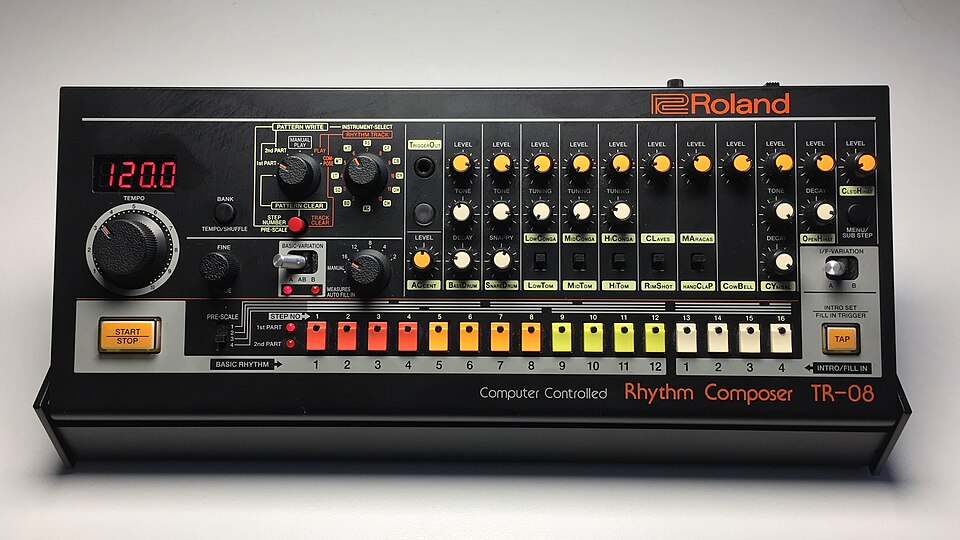

Five ideas to understand first
- Step. One time slot. A TR-08 pattern starts at 16 steps, and each step is a sixteenth note, so four steps make one beat and 16 steps make one bar of 4/4.
- Instrument. One drum sound. The TR-08 has 11 instrument channels, each with its own row of 16 steps. (Roland’s manual calls them instruments. Other machines call them parts or tracks.)
- Rhythm pattern. All 11 rows together, looping. Each pattern has two versions, A and B, so you can write a main beat and a variation in the same slot.
- Tempo. Speed in beats per minute (BPM). House sits around 120 to 128, hip hop around 85 to 95, drum and bass around 170.
- Play versus write. The 16 buttons along the bottom do two jobs. In MANUAL PLAY they choose which pattern plays. In PATTERN WRITE they are the 16 slots of the grid. The mode switch decides which.
How the 16 steps map to counting out loud:
| Step | 1 | 2 | 3 | 4 | 5 | 6 | 7 | 8 | 9 | 10 | 11 | 12 | 13 | 14 | 15 | 16 |
|---|---|---|---|---|---|---|---|---|---|---|---|---|---|---|---|---|
| Count | 1 | e | and | a | 2 | e | and | a | 3 | e | and | a | 4 | e | and | a |
Steps 1, 5, 9 and 13 are the four main beats. Remember these four numbers; you will use them constantly. The 808 helps: the buttons are coloured in groups of four (red, orange, yellow, white), and each group is one beat.
Hear it in a real song. Put on almost any pop or rock song and clap along on “2” and “4”. Those claps land on steps 5 and 13, which is where the snare sits in most popular music. The kick nearly always lands on step 1, and often on or around step 9 as well. Once you can hear this, you can work out the basic beat of most songs by ear.
The instruments
The select switch chooses which instrument you are writing. Its positions run in this order. Five of the channels have a small switch under their knobs that swaps between two sounds; only one of the pair can be used in a pattern at a time.
| Select | Instrument | Alternate sound (small switch) | Knobs |
|---|---|---|---|
| AC | Accent (not a sound, see below) | LEVEL (the ACCENT knob) | |
| BD | Bass drum (kick) | LEVEL, TONE, DECAY | |
| SD | Snare drum | LEVEL, TONE, SNAPPY | |
| LT | Low tom | Low conga | LEVEL, TUNING |
| MT | Mid tom | Mid conga | LEVEL, TUNING |
| HT | Hi tom | Hi conga | LEVEL, TUNING |
| RS | Rim shot | Claves | LEVEL |
| CP | Hand clap | Maracas | LEVEL |
| CB | Cowbell | LEVEL | |
| CY | Cymbal | LEVEL, TONE, DECAY | |
| OH | Open hi-hat | LEVEL, DECAY | |
| CH | Closed hi-hat | LEVEL |
That makes 16 sounds in all. Every one is a model of the original 808’s analogue circuits, so the knobs behave like the real thing.
Accent is the 808’s secret weapon. Steps you write on the AC row play every instrument on that step louder, by an amount set with the ACCENT knob. It’s how a plain grid starts to feel played.
The rest of the panel
- TEMPO dial sets the speed; FINE nudges it. The four-character display shows the tempo and settings. VOLUME is on the back.
- Mode switch chooses what the machine is doing: PATTERN CLEAR, PATTERN WRITE (1st PART or 2nd PART), MANUAL PLAY, and the rhythm track modes PLAY and COMPOSE (Lesson 8).
- CLEAR clears an instrument or a pattern, and sets pattern length (Lesson 4).
- BASIC-VARIATION switch picks A, B, or AB (alternate A and B every bar).
- I/F-VARIATION switch picks A or B for the intro and fill-in patterns.
- MEASURES (AUTO FILL IN) sets how often a fill plays automatically: MANUAL, or every 2, 4, 8, 12 or 16 bars.
- PRE-SCALE switch sets what one step is worth: 3 is ordinary sixteenth notes; 1, 2 and 4 are for triplets and 32nds.
- START/STOP runs the sequencer. TAP inserts fills, starts intros and records in real time.
- BANK chooses one of 16 banks, and with FINE sets shuffle. MENU/SUB STEP opens the menu and adds in-between notes.
- TRIGGER OUT sends a pulse to other gear, and with BANK opens mute and solo (Lesson 7).
- Steps 1 to 12 double as the BASIC RHYTHM buttons and steps 13 to 16 as the INTRO/FILL IN buttons. The labels under the buttons show both jobs.
The original
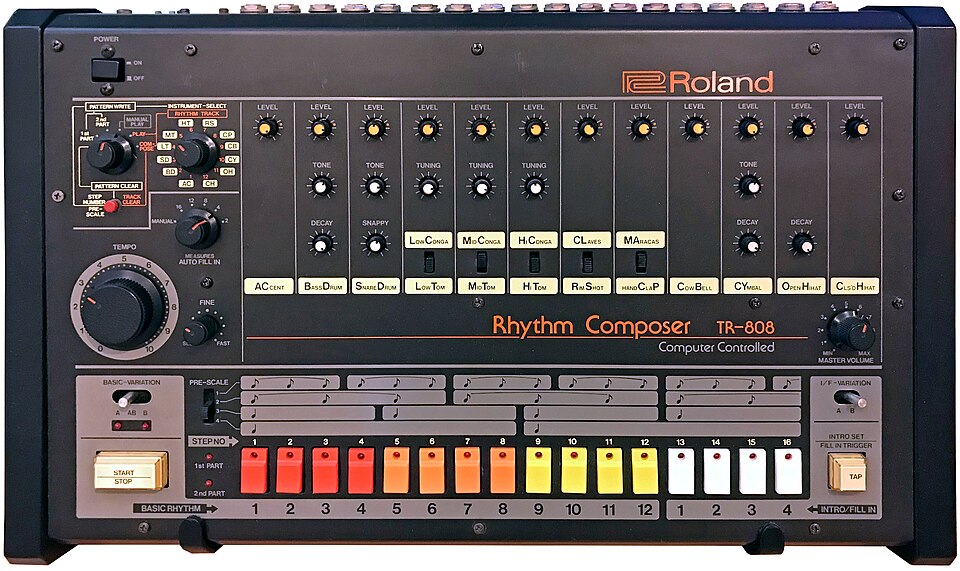

Put the two side by side and the layout is the same knob for knob. The TR-08 is smaller, adds a display, the menu, sub steps and USB, and runs on batteries.
Exercise 1
Without looking at this page, name the instrument at each position of the select switch, say which five instruments have an alternate sound, and say which four step numbers are the main beats.