Course
Korg Volca Beats: A Hands-On Training Course
Ten short lessons from switching on to programming, saving and performing your own beats.
About the gear
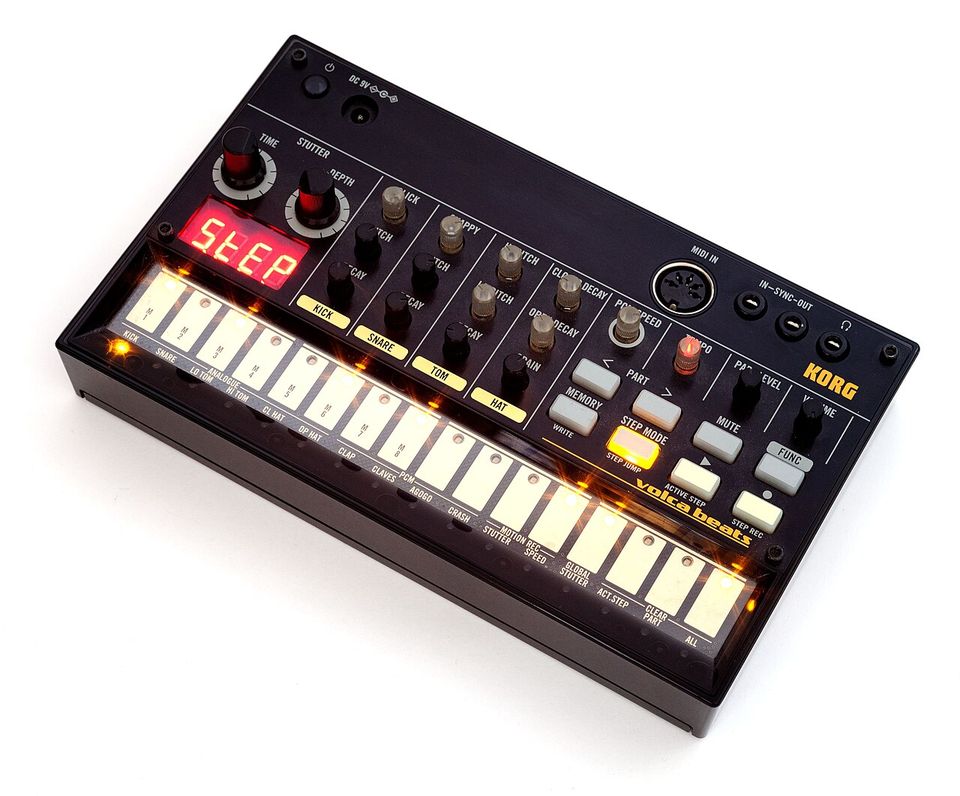
- Analogue drum circuits (kick, snare, toms, hats) plus PCM sounds for clap, claves, agogo and crash
- 16-step sequencer with stutter, active step, step jump and motion recording
- SYNC in and out, plus MIDI IN, for syncing to other gear or a DAW
- Runs on batteries or a 9 V adapter, with a built-in speaker and a headphone output
Official info and manuals
- Korg product page ↗
- Features and specifications ↗
- Owner's manual and downloads ↗
- Background on Wikipedia ↗
Prefer to watch or listen?
- Discover the Korg Volca Beats: overview ↗ Korg UK
- Korg Volca Beats Tutorial ↗ Nick Capron
- Korg Volca Beats Sound Demo ↗ Tony Horgan
- Korg Volca Beats jam and demo (no talking) ↗ Static Buzz
Lessons
- How to use this course
- Drum machine basics and a tour of the panel
- Setting up and getting first sound
- Shaping the sounds
- Programming your first beat in step mode
- Real-time recording, editing and clearing
- Saving and managing patterns
- Stutter, motion recording and performance tricks
- Longer arrangements, sync and MIDI
- Classic beat recipes
- 80s and 90s grooves you'll recognise
- Quick reference and troubleshooting
- Appendix: Music terms