
Korg Volca Beats
Lesson 1: Drum machine basics and a tour of the panel
A drum machine is a loop of 16 time slots, and each drum either plays in a slot or it doesn’t. Once that idea clicks, everything else on the Volca Beats is detail.
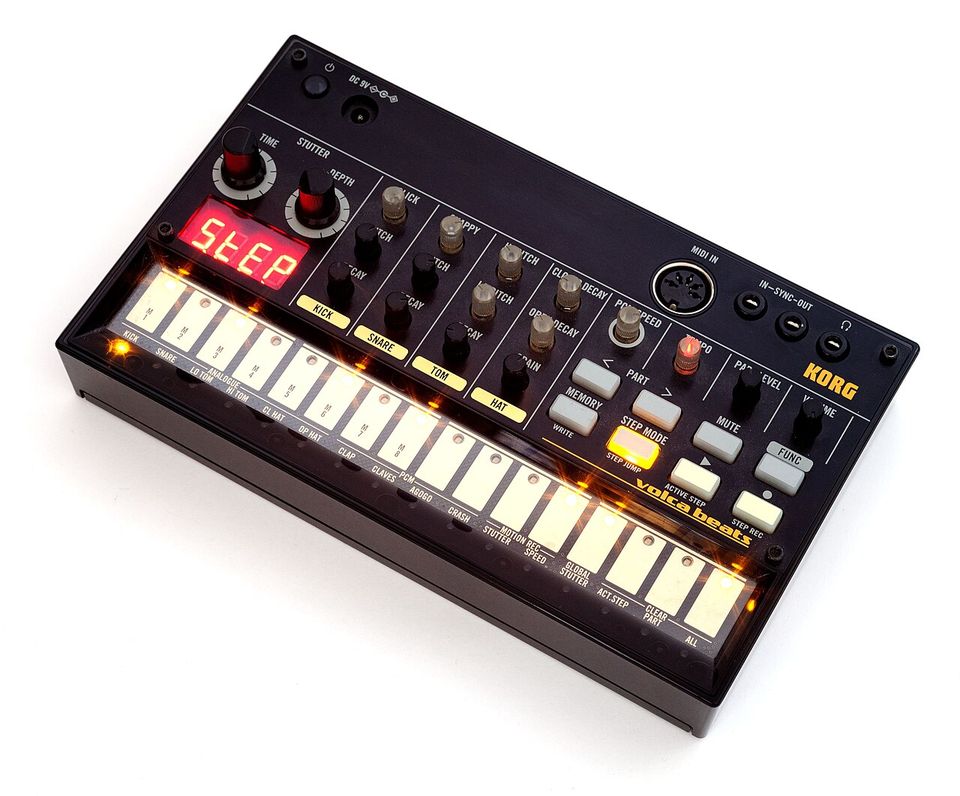

Five ideas to understand first
- Step. One time slot. The Volca Beats has 16 steps per pattern, and each step is a sixteenth note, so four steps make one beat and 16 steps make one bar of 4/4.
- Part. One drum sound. The Volca Beats has 10 parts, each with its own row of 16 steps.
- Pattern (Korg calls it a sequence). All 10 rows together, looping. There are 8 memory slots to save patterns in.
- Tempo. Speed in beats per minute (BPM). House sits around 120 to 128, hip hop around 85 to 95, drum and bass around 170.
- Live versus step mode. The 16 buttons along the bottom do two jobs. In live mode they are drum pads. In step mode they are the 16 slots of the grid.
How the 16 steps map to counting out loud:
| Step | 1 | 2 | 3 | 4 | 5 | 6 | 7 | 8 | 9 | 10 | 11 | 12 | 13 | 14 | 15 | 16 |
|---|---|---|---|---|---|---|---|---|---|---|---|---|---|---|---|---|
| Count | 1 | e | and | a | 2 | e | and | a | 3 | e | and | a | 4 | e | and | a |
Steps 1, 5, 9 and 13 are the four main beats. Remember these four numbers; you will use them constantly.
Hear it in a real song. Put on almost any pop or rock song and clap along on “2” and “4”. Those claps land on steps 5 and 13, which is where the snare sits in most popular music. The kick nearly always lands on step 1, and often on or around step 9 as well. Once you can hear this, you can work out the basic beat of most songs by ear.
The 10 parts
In live mode, step buttons 1 to 10 play the parts in this order (check the labels printed above the buttons on your unit).
| Button | Part | Engine | Sound controls |
|---|---|---|---|
| 1 | Kick | Analogue | CLICK, PITCH, DECAY |
| 2 | Snare | Analogue | SNAPPY, PITCH, DECAY |
| 3 | Lo Tom | Analogue | LO PITCH, shared DECAY |
| 4 | Hi Tom | Analogue | HI PITCH, shared DECAY |
| 5 | Closed Hat | Analogue | CLOSED DECAY, shared GRAIN |
| 6 | Open Hat | Analogue | OPEN DECAY, shared GRAIN |
| 7 | Clap | PCM sample | PCM SPEED |
| 8 | Claves | PCM sample | PCM SPEED |
| 9 | Agogo | PCM sample | PCM SPEED |
| 10 | Crash | PCM sample | PCM SPEED |
The rest of the panel
- TEMPO sets the speed. VOLUME is master output. PART LEVEL sets the volume of whichever part is selected.
- STUTTER TIME and DEPTH repeat the selected part like a drum roll or echo (Lesson 7).
- PART < and > step through the parts to choose which one you are editing.
- STEP MODE flips the bottom row between drum pads (unlit) and the step grid (lit).
- MUTE silences parts. MEMORY loads and saves patterns.
- FUNC is the shift key. Hold it and press another button for the secondary job printed under that button.
- REC and PLAY record and run the sequencer.
- The small LED display shows tempo and knob values as you turn them.
Exercise 1
Without looking at this page, name the part on each of buttons 1 to 10, and say which four step numbers are the main beats.